
JEE Main 2026 Registration Process – Complete Step-by-Step Guide
Short Information:- JEE Main is conducted by NTA twice every year (Session 1 & Session 2). To appear in the exam, every candidate must complete the online registration on the official website. Below is the most detailed and updated step-by-step process for JEE Main 2026 registration.
Step 1. Visit the Official Website
Only use jeemain.nta.nic.in or nta.ac.in. Never register on any coaching or third-party website. Session-1 registration usually starts in the first week of December 2025, and Session-2 in March/April 2026.
Step 2. Click on “New Registration”
On the homepage, click the big button “JEE (Main) 2026 – Application” → “New Candidate Registration”. Read all instructions carefully, tick the declaration checkbox, and click “Proceed”.
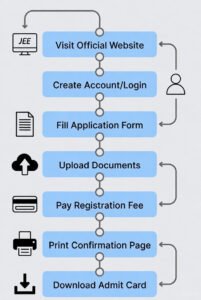
Step 3. Fill Personal Details
Enter Name (exactly as in Class 10 certificate), Date of Birth, Gender, Category (Gen/EWS/OBC-NCL/SC/ST), PwD status, Nationality, Aadhaar number (optional but recommended), Mobile number & Email ID. Double-check everything – changes are not allowed later.
Step 4. Create a Strong Password
Password must be 8–13 characters, containing at least 1 uppercase, 1 lowercase, 1 number, and 1 special character (@#$%&*). Choose a security question & answer. Save the password securely.
Step 5. Note Down Application Number
After submission, your unique JEE Main 2026 Application Number will be generated and displayed. Take a screenshot immediately – you will need it for login, admit card, and result.
Step 6. Upload Photo, Signature & Certificates
• Photograph: Recent passport size, white background, 10–200 KB, JPG
• Signature: Black ink on white paper, 4–30 KB, JPG
• Category/PwD/EWS certificate (if applicable): 50–300 KB, PDF Keep scanned copies ready in exact size to avoid rejection.
Step 7. Choose Exam Cities (4 Preferences)
Select 4 cities in order of preference. Apply early to get your preferred city. Foreign centres are also available (higher fee).
Step 8. Enter Educational Qualifications
Class 10 & Class 12 details: School name, Board, Year of Passing/Appearing, Marks/CGPA, Roll number. Students appearing in 2026 will select “Appearing in 2026”. 75% criterion is removed now.
Step 9. Pay Application Fee
Approximate fee (2026 rates will be similar):
• General/OBC (Male): ₹1000 (India)
| Job Role | Fresher Salary | Exp. Salary | Top Cities | Openings | Apply Link |
|---|---|---|---|---|---|
| AI Engineer | ₹15–25 LPA | ₹30–60 LPA | Bangalore, Hyderabad | 6000+ | Apply ➤ |
| Generative AI Specialist | ₹18–30 LPA | ₹40–80 LPA | Bangalore, Remote | 4000+ | Apply ➤ |
| Machine Learning Engineer | ₹16–28 LPA | ₹35–70 LPA | Bangalore, Pune | 5000+ | Apply ➤ |
| Data Scientist (AI/ML) | ₹14–24 LPA | ₹28–55 LPA | Bangalore, Delhi-NCR | 3500+ | Apply ➤ |
| MLOps Engineer | ₹17–27 LPA | ₹32–58 LPA | Bangalore, Hyderabad | 2500+ | Apply ➤ |
Step 10. Final Review & Submit
Re-check every detail. Once submitted, download the Confirmation Page and take 4–5 printouts (required during counselling too).
Step 11. Correction Window (Very Important)
NTA opens a 3–4 day correction window in Feb/March (Session 1) and April/May (Session 2). You can change photo, signature, name (limited cases), category (with proof), and exam cities. Extra fee may apply (₹200–1000).
Step 12. Download Admit Card
Available 4–5 days before the exam on the same website using Application Number & Password. No admit card = No entry in exam hall.
Pro Tips from Jobpulse.in
- Fill the form late at night or early morning to avoid server slowness.
- Use only one mobile number & email ID – multiple applications from same details will be cancelled.
- Session 1 & Session 2 require separate applications.
- Best of two attempts rule: Your higher score from both sessions will be considered for ranking.
Start your JEE Main 2026 preparation along with registration – stay ahead! All the best from team Jobpulse.in! 🚀